Your Attribution Is Lying To You
Is last-click attribution lying to you? Discover Launch CEO Jaye Cowle’s 4-step measurement framework to break performance plateaus and drive…

By Danny Ireland, Josh Marinaro and Harry Dunn
Imagine you’re on the high street choosing somewhere to buy your fruit and veg. One choice is a shop with the shutters half shut, meaning you can only just make out a shelf of melons in the window. The shop’s name is in small print on a tatty piece of paper sellotaped to the door. You can barely be bothered to peek inside but when you do the produce is badly labelled – are the grapes seedless? Are those baking potatoes or new potatoes?
Next door is another greengrocers. This one proudly displays produce in shelves out front, celebrating locally sourced berries and sweet juicy donut peaches. Prices are clearly labelled, a local business award is displayed at the entrance and the logo nods to The Hungry Caterpillar which makes you smile.
We’re guessing you’d pick the second choice, as would most other shoppers. And this matters because the same rules of engagement apply to online shopping.
Shabbily organised, unloved shopping feeds mean customers look straight past you, which has implications beyond your ad budget – it puts your growth at risk.
The way our paid media team approaches shopping feeds has shifted massively in 2026. Yes we do the basic hygiene, because that visibility is non-negotiable. But we frame this as part of a wider look at growth and efficiency.
Your shopping feeds can be a hotbed of efficiency savings. Are you making the most of them? Are you really understanding which products drive revenue? And how can we prepare for what’s coming in Google ads?
This article tells marketing leaders everything they (plus their team) needs to know to run top performing shopping feeds in Google Ads with minimal additional investment. It is based on insights from three of our most experienced Paid Media experts.
We run through:
We call them basics but we’re often surprised when we do audits how much of the following has been missed.
So we’re going over them here as you can’t build on quicksand. These are the foundations of all optimised shopping feeds in Google Ads.
Choose between using a third-party platform like Shoptimised much easier, or a lower scale option using a supplemental feed in a Google Sheet to manually change shopping titles and backend attributes. Our webinar walks you through how this can be set up.
Whatever method you use, the way to scale is to set up a system which allows for a constant test and learn cycle. A single word added to a listing might boost conversion – but if you never try any variations you’ll never know.
We see too many advertisers adding the bare minimum information on their products in the backend. Unlike search ads that use keywords, Google Shopping relies on these backend attributes to work out when your product should show up for a specific query.
Focusing on ‘the most important’ attributes and neglecting:
Is not an efficient way of saving time, it’s a way to show your office-wear black chinos to a buyer who was after waterproof hiking trousers. We’ll let you decide if that’s good use of your ad budget.
This is the first glimpse customers will have of your product and if it doesn’t stand out, they will scroll right on by. Some subtle and straightforward adaptations to copy and imagery can make a big difference.

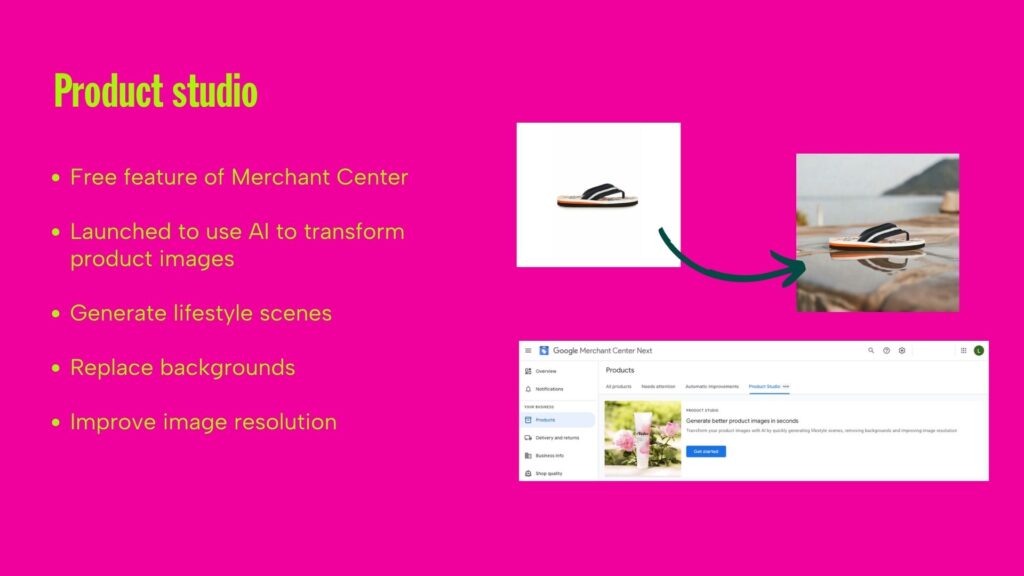
When using AI for images, be as descriptive or as vague as you like, but remember that the more accurate the product description and the more accurate the scene, the better results you’re likely to get.
Your listing is not appearing in a void. Building an understanding of how your target audience will interact with your listings can give your ads the edge they’ll need to drive engagement.
A very simple and effective test is to Google a search term you want to appear for and simply assess the listings. Ask yourself: is there lifestyle imagery? Are there reviews? Are the price points better or worse than yours?
Use a small voucher incentive to buy 30 minutes of their time. Ask them about their perceptions of your brand and what specifically stands out to them in your shopping listings.
Use platforms like Lyssna to conduct five second testing. Show users a listing or product page for five seconds to see if your imagery is poor, your price is too high, or your delivery messaging is unclear.
As marketers we’re operating in a digital realm where the only certainty is uncertainty. At Launch, we’re seeing the clients who are able to grow are the ones who regularly test and learn – this unlocks continuous insight which evolves with user preference and behaviour. Run your feeds with this mindset and you’re positioned for success.
Some simple ideas for tests you can run include:
Create an exact duplicate of your product in your feed to test specific changes. For example, add the word ‘authentic’ to one title and compare the click-through and conversion rates against the original.
Go into the settings cog in Merchant Center, select “apps and services,” and check if merchant center is connected to GA4. This unlocks some really nice data so you can see the difference between your paid and organic shopping performance.
Ensure you are checking the default channel group report in GA4 to see how your organic shopping listings are performing compared to paid ads.
The webinar below walks through many of these technical adjustments.
Once the technical foundation is solid, we need to talk about how your products actually look to a customer.
For years, the shopping feed was a back-office technical task—a spreadsheet of prices and titles that stayed hidden. That’s no longer true. What we’re seeing now is that Google is using your feed data to build the entire visual experience for the user before they even click.
If your feed is still just a list of SKUs and flat white-background JPEGs, you are essentially running a shop with the shutters down.
Many CMOs assume that because they’ve plugged in Shopify or Magento, the feed is handled. We call this a ‘set and forget’ trap. Default integrations often miss critical attributes such as sizes, materials, or GTINs which act as the keywords for your shopping campaigns.
That’s why at Launch, we’ve moved away from basic CMS exports toward dedicated feed management tools like Shoptimised.
Think about it like this: your website is built for humans to convert. Your feed should be built for the algorithm to index. By using a tool to manipulate data via API, we can append missing data and apply rules at scale across Google, Meta, and Pinterest without touching your site’s backend.
Strategic feed management allows for fast, low-risk testing. We’ve found that what works for your brand on your homepage doesn’t always work in a search result.
For example, there’s often debate about brand in titles. Conventional wisdom says lead with your brand. However, for one homewares client, we tested removing the brand name from product titles to prioritise descriptive search terms. This led to a 20% increase in conversion rate. Note this was achieved without any increase in spend. We just made the feed more relevant to the user’s intent.
In 2026, a healthy feed has to include more than text. Google is increasingly prioritising product videos and new-customer-only promotions directly in the shopping tab.
This is one of the most direct levers we have for lowering your NCAC (New Customer Acquisition Cost). If your competitor has a video and you have a static photo, you’ve already lost the click.
Siloed PPC and SEO workflows can leak Google Shopping revenue. In this webinar and blog we unpack how to build a unified data framework that protects your margins and secures visibility.
Zombie products and diluted budgets can be a real risk to scaling brands. When you’re mapping out your shopping feed strategy they should be top of mind.
As Danny discusses on Keep Optimised podcast, we need to change how we view budget allocation.
If you have 30,000 SKUs and a monthly budget of £10,000, you are effectively spending pennies per product per day. When you spread your budget that thin, the algorithm can’t learn, and your winning products get drowned out by your ‘zombies.’
The antidote to this is a feed audit. Usually, 10–20% of your SKUs drive 80–90% of your revenue.
Our team joined Google Marketing Live to see how AI is further integrating Merchant Centre data into the search journey.
We learned of an approaching shift from daily feed optimisation, to using data to protect your bottom line. Google is transforming the product feed from an advertising tool into the core database for its entire AI ecosystem. The campaign structures you rely on must adapt to upcoming changes to platform mechanics – and there are plenty of them on the table.
The most significant shift on the horizon is the introduction of the Universal Cart. Driven by Gemini, this protocol allows users to research, compare price history, check shipping times, and check out natively inside Google Ads, YouTube, or Gmail using Google Pay.
Marketing leaders should note the following commercial implications:
Future proof your brand by prioritising pristine, machine-readable feed data and high review volume. You also need to state complex attributes (fabric type, texture, compatibility) so AI agents don’t overlook you.
Historically, pushing the algorithm to focus on profitability rather than raw revenue meant building complex, custom data setups. In Q3 2026, Google is introducing Product Value Adjustments (PVAs) natively to standard Shopping and Performance Max campaigns.
This allows us to apply precise numeric multipliers (like 1.2x or 1.5x) directly to specific SKUs or entire product categories inside the feed.
It gives you immediate, tactical control over automated bidding weights. If you need to clear slow overstock, protect the visibility of a high-margin private label, or artificially boost a bestseller, you can alter the bidding weight instantly without blowing up your existing campaign structures.
The average customer journey spans multiple weeks and automated smart bidding often learns too late. If a customer takes 45 days to buy, the algorithm is learning from best practices that are already a month and a half out of date.
Google’s rollout of Qualified Future Conversions (QFC) attempts to solve this lag using real-time modelling to look at top-funnel activity, eg deep conversational ad engagement.
It uses this data as real-time feedback to adjust smart bidding today based on the probability of a sale next month. For challenger brands navigating long consideration cycles, this keeps budgets focused on high-probability growth.
Treating the shopping feed as an afterthought can be the single biggest handbrake on growth for e-commerce brands.
Not sure if your feed is working? You just need to look at the numbers. If you are spreading your budget across thousands of products without a clear rule for margin or new customer acquisition it will hamper your scaling efforts.
Some tools and offerings from us if you’re gunning for growth and not sure where to start:
Danny has 10+ years experience helping brands drive growth from their performance marketing. After a significant time working for Google, he joined Launch and heads up our Paid Media expertise. He oversees the planning, build, and execution of client’s global paid strategies to help our clients reach their north star objectives.
Connect with Danny on LinkedIn.
Harry has 5 years of experience in digital marketing and paid media. At Launch, Harry manages paid media strategies for a diverse range of clients from major airlines to boutique brands, driving impactful results and working as an extension of the client team.
Connect with Harry on LinkedIn.
Josh has 8 years of experience in performance marketing, specializing in PPC and CRO strategies. Before joining Launch, he worked as a PPC Manager at a full-service agency. At Launch, Josh focuses on combining his work across paid search and experimentation to get award-winning results for his ecommerce and travel clients.
Connect with Josh on LinkedIn.
Danny joined Chloe Thomas on Keep Optimising podcast to share his wisdom on optimising Google Shopping Feeds.
Is last-click attribution lying to you? Discover Launch CEO Jaye Cowle’s 4-step measurement framework to break performance plateaus and drive…

Discover how to test Google AI Max for Search safely. Our 3-phase framework covers query expansion, URL controls, and brand…

Traditional search is fracturing, and operating SEO and PPC in isolated silos is rapidly becoming unsustainable. Here's how Marketing leaders…